Pi:Main Page: Difference between revisions
From SpecNext Wiki
No edit summary |
No edit summary |
||
| Line 5: | Line 5: | ||
The RPi0 has a Broadcom BCM2835 SoC with an ARMv6 core, a Videocore 4 GPU, and its own 512 MB memory and HDMI output. It has its own SD card from which it boots. | The RPi0 has a Broadcom BCM2835 SoC with an ARMv6 core, a Videocore 4 GPU, and its own 512 MB memory and HDMI output. It has its own SD card from which it boots. | ||
== Hardware == | |||
Attach a Raspberry Pi Zero to the Spectrum Next, use a 20x2 pin female header needs to be attached on the underside of the Pi: | |||
<gallery> | <gallery> | ||
| Line 17: | Line 15: | ||
SpecNextBoardAcceleratorFitted.jpg|RPi0 fitted | SpecNextBoardAcceleratorFitted.jpg|RPi0 fitted | ||
</gallery> | </gallery> | ||
== Software == | |||
[[Pi:NextPi|NextPi]], the dedicated Linux distro for the Raspberry Pi 0 in the Next does not support the WiFi on the Pi0W. At this stage the Raspberry Pi cannot be used as a network interface for the Next. | |||
Revision as of 14:34, 8 November 2019
Raspberry Pi : Main Index
The Spectrum Next has a 40 pin (20x2) male header to which a Raspberry Pi Zero (RPi0) can be connected. It is labelled Accelerator Board on the main board.
The RPi0 has a Broadcom BCM2835 SoC with an ARMv6 core, a Videocore 4 GPU, and its own 512 MB memory and HDMI output. It has its own SD card from which it boots.
Hardware
Attach a Raspberry Pi Zero to the Spectrum Next, use a 20x2 pin female header needs to be attached on the underside of the Pi:
-
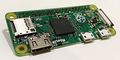 RPi0 top
 -
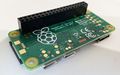 RPi0 bottom
 -
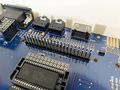 Male 40 pin header
 -
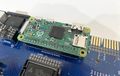 RPi0 fitted


Software
NextPi, the dedicated Linux distro for the Raspberry Pi 0 in the Next does not support the WiFi on the Pi0W. At this stage the Raspberry Pi cannot be used as a network interface for the Next.